
Phone Id - Fake Caller Buster
Fake Caller BustCommunication
4.21.62K Reviews
- Version
- 7156
- Installs
- 1.00M
- Age Rating
- Everyone
Screenshots
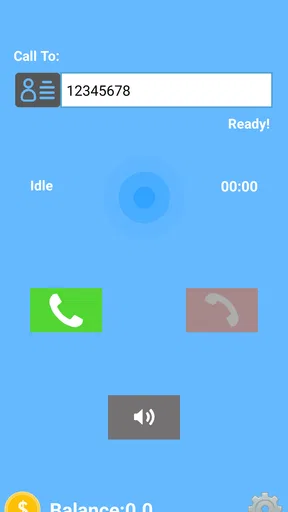
Our Review of Phone Id - Fake Caller Buster
 Analysis by Appyee
I’d start with one simple question before setting anything up: what do I want this call to accomplish? A light joke with a friend, a way to end an uncomfortable chat, and a rehearsal for a social situation are very different uses. Keeping the purpose modest makes a pretend call easier to handle and less likely to embarrass someone. That practical distinction matters more than adding lots of detail to the caller profile.
A sensible baseline workflow
My preferred approach is to prepare the call before I need it, choose a caller identity that makes sense in context, and keep the exit brief. If I am at a gathering where I do not know many people, for example, I might arrange a call that gives me a natural moment to step outside. I would not use it to create a false emergency or imply that a real person is in danger. The app works best as a small social prop, not as a tool for manipulating someone’s decisions.
It also helps to decide what I will say when the call appears. A believable screen can catch attention, but a long performance can make the situation feel staged. I would keep the conversation short, avoid making claims that could cause worry, and put the phone away once I have achieved the harmless purpose. This makes the setup more repeatable: one clear reason, one brief response, then move on.
Settings that deserve a second look
The caller’s name, number, photo, ringtone, and timing all affect how convincing a staged call feels. I would choose details that fit together rather than treating each option as decoration. A familiar name paired with an unrelated photo, for instance, can make the screen look less plausible. If I am using the call around people who know me well, a restrained setup may attract less scrutiny than an elaborate one.
Voice playback deserves particular care. A recording can make a scenario feel more complete, but it can also be the detail that gives it away if the surroundings are noisy or the timing is awkward. Before relying on it, I would check that the phone’s sound is at a suitable level and that playing audio will not interrupt someone nearby. If privacy is important, a silent screen or a simple excuse may be a better choice than audible playback.
Phone Id - Fake Caller Buster is a free communication app from Fake Caller Bust. It has an Everyone age rating, a 4.2 average from around 16,000 ratings, and over a million installs. The current version is 7156, and it runs on Android 8.0 or later. Optional in-app purchases range from $9.99 to $49.99 per item, so I would check the purchase screen carefully before confirming anything. Those details make it accessible to many Android users, though the purchase range is worth bearing in mind if I only want an occasional fake call.
Using Phone Id with a little judgment
I’d treat a pretend call as a small, prepared cue rather than a guaranteed escape hatch. Before setting one up, I’d decide what I’ll say, where I can step away, and whether the people around me will understand the moment as harmless. That little bit of judgment keeps the setup simple and helps me avoid turning a convenient exit into a confusing scene.
Faster patterns without overcomplicating things
For a recurring situation, a prepared setup is more useful than improvising while people are waiting. I would settle on a neutral caller identity, choose a time that gives me room to respond, and keep the details consistent from one use to the next. That routine cuts down on last-second fiddling and makes it easier to focus on the people around me. I would still review the setup before each call, especially if the setting or audience has changed.
Timing is the trade-off to think through. A call that arrives too early may leave me waiting awkwardly; one that arrives after the moment has passed is no help. Rather than scheduling it at the exact instant I expect to need it, I would leave myself a little flexibility to finish what I am doing and step away naturally. For an event with an uncertain schedule, relying on a fixed call may be less practical than simply asking to leave.
Where a pretend call falls short
This is not a substitute for the ordinary tools people use to identify, block, or manage real incoming calls. Its appeal is the staged call experience, whereas a caller-ID or spam-filtering service is meant to help assess actual callers. If the problem is repeated unwanted calls, I would look to the phone’s call controls or a dedicated screening option instead. Choosing the right kind of app matters: a fake call can create a moment, but it cannot solve a real communications problem.
I would also avoid using it in situations where someone needs accurate information, such as a work handoff, a family emergency, or a conversation where trust is already strained. A quick exit may feel convenient, but a fabricated call can have consequences if another person reacts to it seriously. And if I need dependable help getting away from an unsafe situation, I would seek real support rather than counting on a pretend caller or a scheduled cue.
Who will get the most from it
I can see the appeal for someone who occasionally wants a playful, controlled excuse to step away, or who enjoys setting up a harmless gag among friends who will take it in good spirit. It is less suitable for anyone expecting real caller identification, protection from spam, or a complicated call-management toolkit. People who dislike planning a small scene may also find that a direct, honest exit is quicker and more comfortable.
Compared with simply asking to leave, the app adds a prop and a bit of theatre, but it also asks me to plan the timing and keep the story plausible. Compared with real call-screening tools, it serves a different purpose altogether. I would choose based on the actual need rather than expecting one app to cover both pretend calls and everyday phone safety.
Getting Started with Phone Id
Okay, so diving right in, downloading and installing Phone Id - Fake Caller Buster is as easy as pie. A quick search on your app store, and you’re good to go. The interface is pretty straightforward, which is great for those of us who aren’t tech wizards. As soon as you open it up, you’re greeted with a clean and simple dashboard, making navigation a breeze.
Setting Up Your Fake Call
Now, this is where the magic happens. You can customize almost every aspect of your fake call. Want a call from "Mom"? No problem. You can set the name, number, and even the photo that pops up. The app also lets you schedule the call to come at just the right time. So, whether you need it in five minutes or a couple of hours, it’s got you covered.
One of the coolest features? The ability to use voice recordings. You can either choose from pre-recorded options or record your own. This makes the call seem legit, especially if your friend is a bit skeptical.
Real-Life Scenarios
So, I decided to put it to the test. Picture this: I'm stuck in a tedious meeting, and my phone rings. It’s "the boss" calling. Cue my exit strategy. It worked like a charm, and I was out of there in no time. The app’s realistic interface made it seem totally authentic.
Another time, I pulled off a prank on a buddy. I set up a call from a "secret admirer" and watched the hilarity ensue. The app delivered on its promise, and the look on my friend’s face was priceless.
Customization and User Experience
What’s great about this app is how customizable it is. You’re not limited to just a few options. Whether it’s the ringtone, the caller’s photo, or the call timing, you’ve got control. The app is intuitive, so even if you’re not tech-savvy, you’ll find it easy to use.
One thing to note is that while the app is free, there are some in-app purchases. These aren’t necessary to enjoy the core features, but they do add some extra fun elements if you’re willing to spend a little.
Is It Worth It?
In terms of usability and fun, Phone Id - Fake Caller Buster delivers. It’s a handy little tool for those social situations you’d rather skip or when you’re in the mood for a good laugh. The customization options are a big win, and the realness of the calls is impressive.
However, if you’re looking for an app with more extensive features, you might feel a bit limited. But for what it is, it does the job splendidly.
Overall, if you’re up for a bit of harmless fun or need a clever escape plan, this app is worth a shot. Just remember to use it wisely—no one likes a prank gone too far!
Verdict
Strengths of Phone Id - Fake Caller Buster
- Easy to use with a clean interface.
- Customizable caller ID options.
- Lightweight and fast performance.
- No intrusive ads during use.
- Supports multiple languages.
Limitations of Phone Id - Fake Caller Buster
- Limited features in free version.
- Occasional crashes reported by users.
- Requires internet for some functions.
- May not work on older devices.
- Privacy concerns with data permissions.
Similar Picks in This Category
View All
Google Messages
Google LLC4.6

Gmail
Google LLC4.1

Google Meet
Google LLC4.4

Google Chrome
Google LLC4.1

WhatsApp Messenger
WhatsApp LLC4.6

Carrier Services
Google LLC4.2
Frequently Asked Questions
What is Phone Id - Fake Caller Buster?
Phone Id - Fake Caller Buster is an app designed to help users identify and block fake or spam calls. By utilizing advanced algorithms, it can detect caller ID spoofing and provide users with the necessary information to decide whether to answer or block a call. It aims to enhance call security and user privacy.
How does Phone Id - Fake Caller Buster work?
The app functions by analyzing incoming calls using a comprehensive database of known spam numbers and advanced algorithms to detect caller ID spoofing. When a call is detected as suspicious, the app alerts the user with information about the caller, allowing them to decide whether to answer or block it, thereby reducing unwanted interruptions.
Is Phone Id - Fake Caller Buster available for both Android and iOS?
Yes, Phone Id - Fake Caller Buster is available for download on both Android and iOS platforms. Users can find it on the Google Play Store for Android devices and the Apple App Store for iOS devices. The app ensures compatibility with a wide range of smartphones, offering a seamless experience across platforms.
Does Phone Id - Fake Caller Buster require any permissions to operate?
Yes, for optimal functionality, Phone Id - Fake Caller Buster requires permissions to access your phone's contacts and call logs. This is necessary to accurately identify and block spam calls. The app also requests permission to send notifications, ensuring you are alerted promptly about any suspicious activity.
Is there a cost associated with using Phone Id - Fake Caller Buster?
Phone Id - Fake Caller Buster offers a free version with basic features, allowing users to identify and block spam calls. However, for enhanced features such as detailed caller identification and advanced blocking options, a premium subscription is available. Pricing details can be found within the app's settings or on the download page.
